TO snake

  ;setup:

  reset
  ;empties (erases) all containers (variables),
  ;returns the turtles to their default positions,
  ;restores their states to defaults

  release
  ;sets all the turtles, except for the default ones
  ;(myrtle, snappy, libby) 'free' - erasing them

  penup
  ;don't draw

  setbackgroundcolor lightblue

  hideturtle
  ;don't show the executing turtle (typically myrtle)

  stealth
  ;don't show up in output from the near primitive

  noaudiowait
  ;don't delay when playing sounds (the default)]

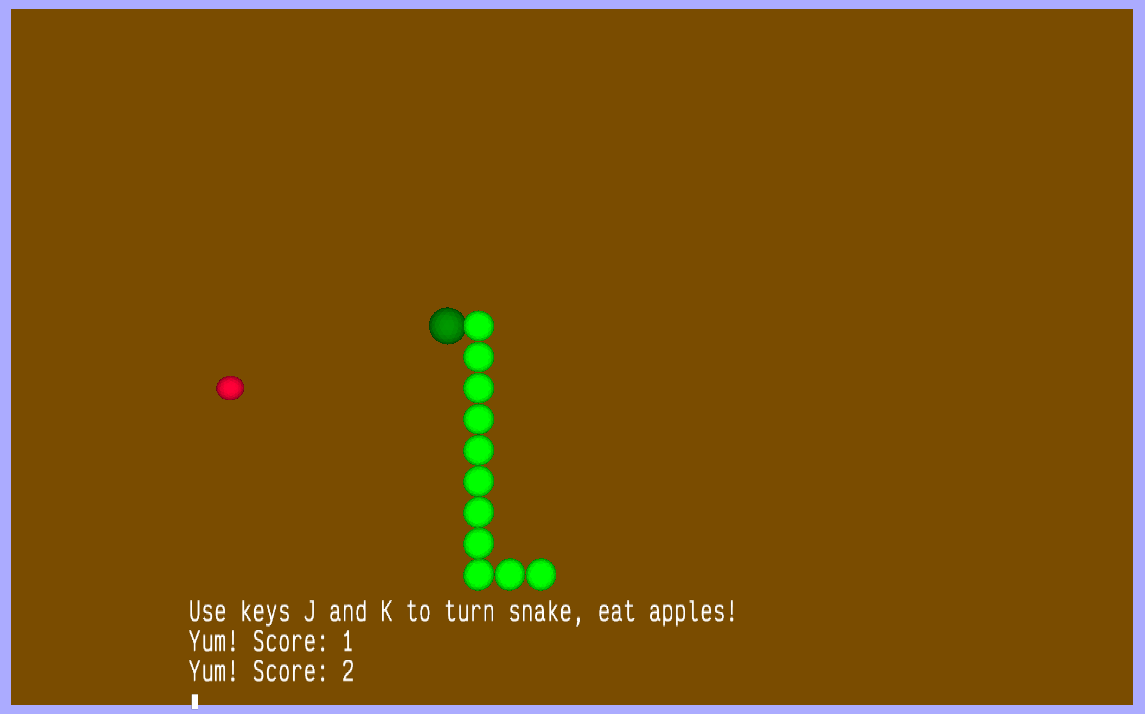
  print |Use keys J and K to turn snake, eat apples!|
  ;print instructions to the screen

  ;create the 'ground'
  setfillcolor brown
  setpos [-185 -115]
  lower 5
  quad 185 * 2 115 * 2

  make "score 0
  make "length 8
  ;the default snake length, in segments

  make "queue empty
  ;this snake implementation uses a push / pull queue
  ;to keep track of the snake's turns

  repeat :length [push "fd "queue]
  ;all segments start moving forward

  newmodel "ball [setfillcolor 12 icosphere 5]
  newmodel "head [setfillcolor 4 icosphere 6]
  newmodel "apple [setfillcolor red icosphere 4]
  ;create turtle models, where ball is a non-head segment

  ;create the turtles that make up the starting snake:
  repeat :length [
    nameturtle repcount
    ;create a new turtle
    ;each segment has the number of its segment as its name

    control repcount {"wrap "penup "back repcount "* 10 "showturtle}
    ;initialize the new turtle and move it into position
    ;{} denotes a 'softlist', a list whose contents are evaluated
    ;at execution

    control repcount [
      setbounds [-185 -115 185 115]
    ]
    ;sets the bounds used for wrapping. [] denotes a 'hardlist', a
    ;list whose contents are fixed and not evaluated

    if repcount = 1 [control 1 [setmodel "head]]
    ;if this is the first segment, give it the 'head' model
    else [control repcount [setmodel "ball]]
    ;otherwise, give it the 'ball' (segment) model
  ]

  ;set up the 'apple' turtle:
  nameturtle "apple
  control "apple [
    penup setmodel "apple showturtle

    dountil (count near position 5) = 1 [
      setpos {-180 + (10 * random 36) -100 + (10 * random 20)}
    ]
    ;set a random position until such times as the apple is not near
    ;any snake segments (turtles)

    ;leading parameters used in comparison operators (=, >, < etc) ;must be enclosed in {}'s if more than a single value or primitive ;because the parser evaluates right to left ] ;the main loop: forever [ norender ;don't render while we shuffle the snake forward for {"i 1 :length} [ make "move item :i :queue ;set the move variable to the :i item in the :queue switch "move case "fd [ask :i [forward 10]] case "rt [ask :i [right 90 forward 10]] case "lt [ask :i [left 90 forward 10]] ;switch / case statements execute instructions based on the ;contents of the container (variable) provided to switch ;ask creates a new worker that executes the commands using ;the specified turtle (the turtle named by :i) ;so, in this for loop we are iterating through the :queue, ;moving the turtle segments based on the item present in ;each space in the queue (fd, rt or lt) ] while workers != [] [sleep 1] ;sleep execution until the ask workers finish moving their ;turtles (the snake). This way, when we enable the render, ;we won't catch the snake mid-move. render ;enable rendering again wait 40 - :score ;wait units are 60ths of a second. The higher the score, the ;shorter the wait will be ;user control: if keyp [ ;did the user press a key? If so, do this stuff: make "input readchar ;take the output from the readchar primitive and place it ;into the input container. keyp indicates if there is a character ;already in the keyboard buffer. If readchar is called when there ;is no character in the buffer, it waits. switch "input case "j [push "lt "queue] ;if the user pressed the j key, push lt to the front of the queue case "k [push "rt "queue] ;if the user pressed the k key, push rt to the front of the queue otherwise [push "fd "queue] ;if no case has been satisfied since switch (the user pressed a key ;other than j or k), push fd to the front of the queue ] else [push "fd "queue] ;similarly, if the user hasn't pressed any key, push fd to the front ;of the queue ignore dequeue "queue ;ignore (drop) the last value off the end of the :queue ;dequeue would ordinarily return this value, ignore sends it into ;the ether ;is there something occupying the same space as the head of the snake? if (count (near 1:position 5)) > 1 [
      ;near returns the names of the turtles within the specified distance (5)
      ;count returns the count of the number of turtles returned by near
      ;if there is more than one (the head itself), we will execute the following:

      if memberp "apple near 1:position 5 [
        ;is it an apple?

        playsound "chomp
        inc "score
        ;increment the value in the score container by one

        (print |Yum! Score:| :score)
        ;to pass more than the default number of parameters to a primitive, wrap
        ;it in parentheses (round brackets)

        dountil (count near apple:position 5) = 1 [
          control "apple [setpos {-180 + (10 * random 36) -100 + (10 * random 20)}]
        ]
        ;place a new apple

        repeat 2 + int (:score / 10) [

          queue "pa "queue
          ;a pa or 'pass' will cause these new segments not to move on the next
          ;iteration, until movement commands are 'shuffled' on to their places
          ;in the queue

          inc "length
          ;increment the value of the length container by one

          nameturtle :length
          ;create a new turtle with the name contained in :length (the new length)

          (control :length {"hideturtle "setmodel ""ball "wrap "penup "setpos
          "query :length - 1 leftbracket "position rightbracket "setvectors
          "query :length - 1 leftbracket "vectors rightbracket})
          ;set up the new turtle and make sure it's positioned next to the
          ;previously last turtle, and is facing in the same direction

          control :length [setbounds [-185 -115 185 115] showturtle]
          ;set the bounds of the new turtle and show it

          wait 10
        ]
        ;add new segment to the snake

      ]

      ;and if it's not an apple?
      else [
        print "crash! playsound "crash finish
      ]
      ;game over, man! game over!
    ]
  ]

END